


Farmers Insurance Inc.
4.74.86K Reviews
App Specs
- Version
- 26.08
- Updated On
- License
- Free
- Downloads
- 1,000,000+
- Developer
- Farmers Group Inc
- Categories
- Finance
- Platform
- Android
Screenshots
 Analysis by AppCompare
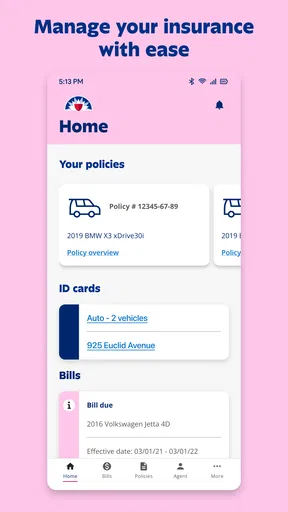
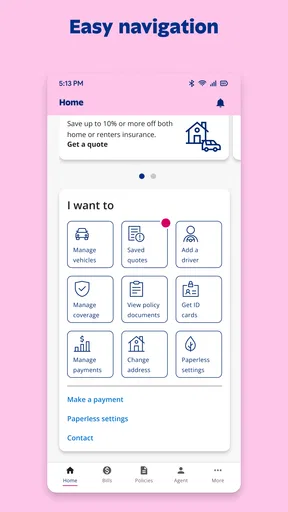
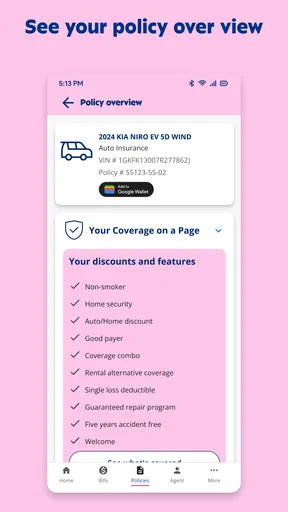
When I need to deal with car or home insurance, the hardest part is often not the policy itself but finding the right card, phone number, payment detail, or claim instruction at the moment I need it. Farmers Insurance is built around that practical problem. It is a free finance app from Farmers Group Inc that brings common insurance tasks into one mobile place, including payments, digital ID cards, claim reporting, and quote requests.
I approached it as I would in everyday life: not as a replacement for understanding a policy, but as a tool for moving from a problem to the next useful action. That distinction matters. An insurance app cannot make an accident less stressful, and it cannot turn a complicated coverage question into a simple one every time. What it can do is reduce the searching, paperwork, and waiting that usually surround routine policy management.
The app has been available since December 22, 2010, and its current version is 26.08. It is rated for Everyone, supports devices running Android 8.1 or later, and has passed the one-million-install mark. Its average score is 4.7 from around 11 thousand ratings, which suggests that many users find the basic workflow dependable. My own view is more specific: it is most useful when you already have a relationship with Farmers and want faster access to familiar tasks.
From an urgent problem to the first useful action
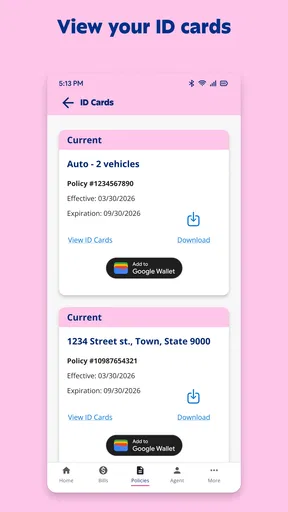
Imagine a realistic situation. I am away from home, someone asks for proof of auto insurance, and I do not have a paper card in my wallet. In the old workflow, I might search through email, call an agent, or wait until I get back to a computer. With this app, the first move is to open my account and look for the digital ID card. That is a small improvement, but it is exactly the kind of small improvement that matters when I am standing beside a vehicle or speaking with another driver.
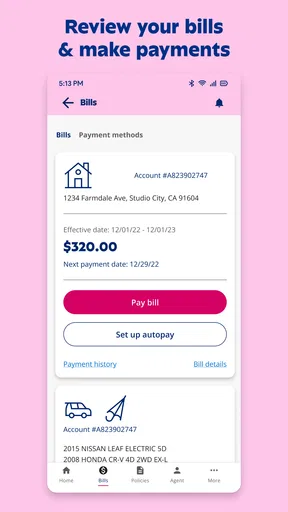
The same starting point works for a payment. Instead of remembering which page of a website handles billing, I can open the app and go directly toward the payment task. The value is not that insurance billing becomes exciting; it is that the app gives the task a clear home. For people who manage several household responsibilities from a phone, that reduction in hunting around is the main reason to keep it installed.
A claim begins differently. The starting condition may be a collision, storm damage, theft, or another event that needs to be reported. In that moment, I would not expect the app to replace emergency services, roadside assistance, a police report, or professional advice where those are appropriate. I would use it after immediate safety concerns are handled, as a guided entry point into the insurer’s reporting process.
That order is important. A mobile claim form is convenient, but convenience should not encourage rushed decisions. I would first make sure everyone is safe, gather the basic facts I can responsibly gather, and then use the app to start the insurance handoff. The app is strongest as a bridge between the incident and the formal claim process, not as a substitute for judgment at the scene.
Worth Reading Before You Choose

EA SPORTS FC Mobile 26 Is a Bigger Football Game, but It Takes Time

Flipboard Shows What News Apps Must Do Beyond the Feed

Switching to Android Auto Means Rethinking Your Driving Routine

Google Calendar Makes a Crowded Week Easier to Manage

Ludo King Makes the Most of the Minutes Between Plans

Baby Panda World Brings Quick Play to Modern Phones, but Its Game Library Feels Busy
What I would prepare before opening it
Good preparation makes the app feel much more useful. For a payment, I would have the relevant billing information ready and check that I am signed into the correct account. For a digital ID card, I would open it before I am under pressure, confirm that the displayed information is current, and avoid waiting until another person is standing beside me.
For a claim, I would collect the details I already know without guessing: when and where the event happened, what was damaged, and who was involved. If photographs or documents are part of the process presented to me, I would keep them organized before starting rather than switching repeatedly between apps. This is one of the less obvious advantages of treating the app as a workflow rather than a magic button: the quality of the handoff depends partly on the information I provide.
A quote request has a different preparation burden. Someone shopping for coverage should think about what they actually want to insure and what questions they need answered before beginning. A quote is useful for comparison, but it is not automatically the same thing as a final coverage decision. I would use the app to begin the conversation, then read the details carefully instead of choosing based only on a headline number.
Moving through the main tasks
The payment path is the most routine of the app’s jobs. I see it as a place for completing a known obligation, not as a full personal-finance dashboard. That makes it appropriate for someone who wants to handle an insurance bill without opening a browser, but less suitable for someone who wants broad budgeting, spending analysis, investment tools, or a unified view of accounts from different companies.
There is also a useful behavioral advantage here: keeping payment access beside ID cards and claims means I do not need to remember several separate Farmers channels. I can use the same mobile starting point whether the issue is scheduled and ordinary or sudden and stressful. That consistency is more valuable than a long menu of unrelated financial features.
The digital ID card workflow is especially practical for recurring situations. I would check it before lending a car, preparing for a trip, or handling a routine document request. A phone-based card is not automatically better than a physical backup, though. Phones lose power, screens can be difficult to read in bright conditions, and account access can become inconvenient when connectivity or sign-in creates friction. I would keep a sensible backup plan rather than treating the app as the only proof I will ever need.
Reporting a claim is where the app’s role becomes more consequential. I would expect to enter the initial event information and follow the prompts toward Farmers’ claims process. The important benefit is speed of initiation: I can start the record while the details are fresh instead of postponing the first notification. The limitation is that starting a claim does not mean the entire matter is resolved inside the app. Assessment, documentation, communication, and decisions may still require further interaction.
That is not a flaw unique to this product; it is a reality of insurance. Still, users should understand the boundary. If I want a simple status check, I would look for the relevant claim or account area. If the situation becomes complicated, I would be ready for a handoff to a person or another formal channel. A good mobile workflow is not one that hides every handoff. It is one that gets me to the correct handoff without making me repeat the story unnecessarily.
Where the handoffs matter most
Insurance involves several parties, and the app sits in the middle of those relationships. I may begin as the policyholder, pass information to Farmers, speak with an agent or claims representative, and later provide details to a repair shop, lender, property manager, or another driver. The app helps with the first digital step, but it does not control every later step.
That means I would pay attention to what I have submitted and what still needs action. After reporting an incident, I would save any reference information the process gives me and watch for the next instruction. I would not assume that closing the app means the claim is complete. This is a concrete habit that prevents a common mistake: confusing successful submission with successful resolution.
The same principle applies to quotes. The app can be a convenient starting point for someone considering Farmers, but comparison shopping often requires looking at equivalent coverage, deductibles, exclusions, and service expectations. A quote from one insurer is not meaningful if I compare it with a different level of protection elsewhere. For that reason, I would use the app for speed, then slow down for the decision itself.
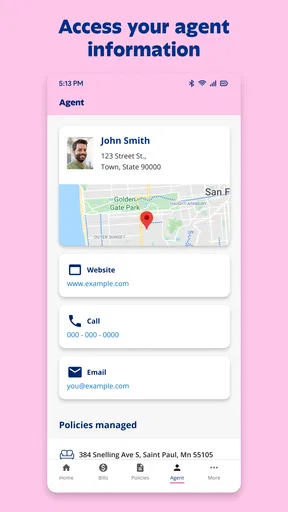
Customer support is another important handoff. A mobile interface is efficient when the request is standard and the account information is easy to match. It is less comfortable when I need to explain unusual circumstances, dispute a detail, or ask a question that does not fit a form. In those cases, I would rather move to a knowledgeable representative than force the issue through repeated taps.
What the workflow delivers in practice
The result I get from Farmers Insurance is a more direct route to everyday policy administration. I can treat it as a pocket access point for insurance rather than a general-purpose money app. That focus is a strength because the important actions are easy to understand: pay, show identification, report, or begin a quote conversation.
The app also benefits from familiarity. Farmers Group Inc is clearly identified as the developer, and the product’s long presence on mobile helps explain why it feels like an established companion to an existing insurance relationship rather than a temporary experiment. Its free price removes a basic barrier to trying it, although the real value still depends on whether Farmers is the insurer I use or am seriously considering.
For a household, the practical outcome is less scattered administration. One person may need the ID card while another handles a payment or begins a claim. I would still be careful about account security and about who is authorized to act, especially when several people share devices or insurance responsibilities. Convenience should not lead me to leave an account open on a borrowed phone or hand over access casually.
The app’s broad adoption and strong average rating are encouraging, but they do not guarantee that every task will feel equally smooth on every device or account. A rating summarizes many experiences; it does not tell me whether a particular claim is simple, whether my account details are ready, or whether my situation fits a standard path. I would interpret the rating as evidence of general usefulness, not as a promise that insurance itself will be frictionless.
Where I would expect the flow to break
The first weak point is urgency. During a serious accident or major property loss, I may be too stressed to navigate an app carefully. If the screen asks for information I do not have, or if I need clarification before submitting anything, the digital route can feel slower than speaking to a person. I would use the app to begin when it is safe and practical, but I would not hesitate to choose a direct human channel when the situation is unclear.
The second weak point is account dependence. The app is designed around access to Farmers-related information, so it is not a neutral insurance organizer for policies from many companies. Someone who wants one dashboard for several insurers may prefer a broader financial-management tool, even if that tool lacks the direct claim and ID-card connection available here. This is a genuine trade-off: specialization gives Farmers customers convenience, while it limits usefulness outside that relationship.
The third is comparison. The quote function can help a potential customer get started, but it should not be mistaken for an independent marketplace. If my priority is to compare many insurers side by side, I would use a comparison-oriented service or contact several providers. If my priority is to manage an existing Farmers policy quickly, this app is the more natural choice.
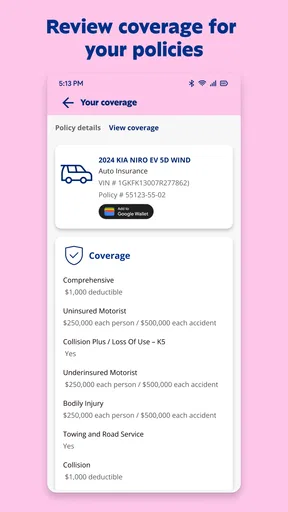
There is also a difference between visibility and understanding. Seeing an ID card or opening a payment screen is straightforward. Understanding coverage language, deciding whether to file a claim, or judging how a policy applies to an unusual loss requires more care. I would not let a clean interface substitute for reading policy documents or asking questions when the financial consequences are significant.
Who should install it, and who should look elsewhere
I would recommend it to current Farmers customers who regularly need mobile access to policy administration. It is particularly well suited to people who dislike carrying paper documents, want to initiate a claim without searching for a phone number, or prefer handling a payment from a phone. It also makes sense for someone considering Farmers who wants to begin the quote process digitally before deciding how to continue.
I would be more cautious if I rarely use a smartphone, have unreliable access to the account, or prefer handling every insurance matter through a local agent. In those cases, the app may still be a useful backup, but it should not be treated as the main relationship. I would also skip it as a primary tool if I am looking for budgeting, investments, credit monitoring, or policies from multiple insurers in one place. Those are different needs from the focused insurance workflow this app provides.
My best tip is to install and sign in before an emergency, not during one. I would inspect where the ID card, payment area, claim entry point, and quote path are located, then make sure I know how I will reach help if a prompt is confusing. That short preparation changes the experience from searching under pressure to following a route I already recognize.
My second tip is to use the app for speed but reserve time for verification. Before paying, I would check the account and amount. Before relying on an ID card, I would confirm that it reflects the policy information I expect. Before submitting a claim, I would review the facts I entered. These checks take little time and reduce avoidable mistakes at the exact points where a rushed tap can create extra work later.
My third tip is to keep the handoff visible. After starting a quote or claim, I would note what the app asks me to do next and respond through the appropriate channel rather than assuming the process will continue automatically. This is where many digital services feel deceptively complete: the first screen is easy, but the outcome depends on what happens afterward.
Overall, I see Farmers Insurance as a focused and useful finance app for people whose insurance is already connected to Farmers. It turns common tasks into a mobile workflow, gives digital access to important policy actions, and can shorten the distance between an everyday need and the right next step. Its limits are just as clear: it is not a universal insurance manager, not a replacement for human guidance in complicated cases, and not a substitute for understanding coverage.
For me, the deciding question is simple: do I want a convenient mobile doorway into Farmers, or am I searching for a broader financial tool? If the answer is the first, Farmers Insurance is worth keeping ready before I need it. The app is free, available to Everyone, and most valuable when used deliberately: prepare before trouble, submit accurate information, and treat each digital action as the beginning of a real insurance process rather than the end of it.
Pros
- Easy access to policy details
- documents
- and coverage information.
- Quickly submit claims and upload damage photos from your phone.
- Helpful roadside assistance options are available within the app.
- Digital ID cards make proof of insurance easy to find when needed.
- Secure login helps protect personal policy and account information.
Cons
- Some features may require an active Farmers policy to access.
- Claim updates can vary depending on the incident and review process.
- The app may feel less useful for users with simple insurance needs.
- Certain account changes may still require contacting an agent.
- Performance and availability can vary after app updates or during outages.
FAQs for Farmers Insurance Inc.
What is Farmers Insurance Inc., and what can I do with the app?
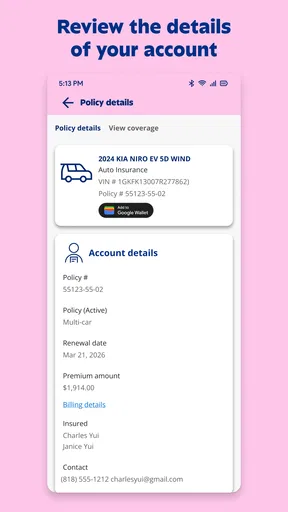
Farmers Insurance Inc. is a mobile companion for Farmers policyholders and customers. After signing in, you can generally review policy information, access insurance documents, make or schedule payments, view billing details, contact support, and manage claims. Available tools may vary according to your policy, state, account type, and whether you use Farmers directly or an affiliated service.
Can I file and track an insurance claim through the Farmers Insurance app?
In many cases, the app allows eligible customers to start a claim, provide incident details, upload photographs or documents, and check claim progress from a mobile device. It may also provide contact options for a claims representative. For emergencies, injuries, or situations requiring immediate assistance, contact the appropriate emergency service first rather than relying only on the app.
Is the Farmers Insurance app free to download and use?
The application is typically free to download from the official Android or iOS store, and Farmers generally does not charge a separate fee simply for accessing standard account features. However, downloading the app uses mobile data, and your insurance policy, optional coverage, deductibles, payment arrangements, or other services may involve costs. Always review your policy and billing information.
What information do I need to sign in or manage my Farmers account?
You will normally need an existing Farmers account and the login details associated with your policy. Depending on the feature, the app may request identity verification, policy information, contact details, or a one-time security code. Use only the official application and keep your password private. If you cannot access your account, use the in-app recovery options or contact Farmers support.
Is the Farmers Insurance app secure, and should I use it instead of contacting an agent?
The app is designed to provide secure access to insurance and billing information, but users should still protect their device with a passcode, avoid logging in on public networks, and install updates from official stores. It is convenient for routine tasks, yet it may not replace an agent or representative for complicated coverage questions, urgent claims, policy changes, or personalized advice.


